Return Policy
"torn sole return policy"
Return window 30 days
Status Eligible
Days used 12 / 30

Our assistants read the shop’s own data before they answer: orders, products, stock levels and shop policies. An AtomStore shop connects to Sensbot through the Atom REST API, with a read-only account.
Registration takes about 10 minutes, and the connection check is automatic.
14 days free · Then a monthly subscription
Integration through the Atom REST API
 +
+ 
A detaching sole is a manufacturing defect - you're on day 12 of a 30-day window.
Start your return: store.com/returns/217168
A prepaid label will be sent to s.johnson@gmail.com.

Real data, real replies
Uses real order, customer and product data from your AtomStore store.
Message
Hello, where is my order #5512? I need it before the weekend.
Reply
Order #5512 was shipped yesterday with DPD. It arrives tomorrow, well before the weekend. Tracking number: 00340434792830.
Context
What it handles
Sensbot reads your AtomStore data and writes the reply. Actions in the shop, such as a return, a cancellation or an address change, are enabled on request.
"Where is my order #5512?"
Order #5512 was shipped yesterday with DPD. Delivery tomorrow.
"I got the wrong size, I want to return it"
The order was delivered 3 days ago and is within the return period. The reply gives the return policy from the shop’s own pages.
"Can I cancel my order?"
The order has not shipped yet. The assistant passes the cancellation request to the shop team.
"Can I change my delivery address?"
The courier has not picked up the order yet, so a change is possible. The assistant passes the new address to the shop team.
Prepared actions
On AtomStore, Sensbot only reads the shop’s data. Actions like these are enabled on request, and a person always approves them.
The customer writes
"The jacket arrived damaged. I want to send it back."
Sensbot prepares
Register the return and send a prepaid label
On requestThe customer writes
"Your discount code did not work at checkout."
Sensbot prepares
Issue a single-use voucher for this customer
On requestThe customer writes
"The listing says 300 ml. The bottle I got is 500 ml."
Sensbot prepares
Correct the product details in your store
On requestNothing runs until you say so. Every action shows what it will change before it changes anything.
Every channel
Sensbot pulls order and customer data from your AtomStore store and writes the reply, wherever the message arrives.
Customer message
Website visitor
Where is my order #217168?
Where is my order?
Where is my order #217168?
Ready reply
Your order was shipped via DPD.
Delivery is scheduled for tomorrow.
Store context
Same reply. Same context. Every channel.
An API user in the AtomStore panel, registration in Sensbot, one line of code.
Create an API user in the AtomStore panel
Ustawienia Administratorzy
Switch on the Atom REST API module, create an empty permission group and a separate API administrator with 16 read methods.
Sensbot never needs methods that create, change or delete anything.
Register the shop in Sensbot
Enter the shop address and the API administrator’s login and password, and click Check connection. Then choose the apps, enter your email and set your own Sensbot password.
We check the connection to the shop automatically.
Chatbot on the website, assistant in the inbox
You paste the chatbot code into Kody marketingowe JS, one line for the whole shop. You connect the email assistant to Gmail, Microsoft 365, IMAP or Thulium.
The chat starts in test mode, and you publish it on the website in the Sensbot panel.
14 days free · Then a monthly subscription
Switch on the Atom REST API module.
Ustawienia → Konfiguracja sklepu → API i integracje FK/ERP → Atom REST API: set it to on (włącz) and click Save (Zapisz). If you do not see this option, ask AtomStore support to switch it on.
Create an empty permission group.
Ustawienia → Grupy uprawnień → Dodaj nową grupę: name it Sensbot API and tick no permissions. This way the API user cannot open the shop panel.
Create a separate API administrator.
Ustawienia → Administratorzy → Dodaj administratora: login for example sensbot-api, Group: Sensbot API, SOAP API access: no, REST API access: yes. The password needs at least 2 digits, otherwise the form does not save and shows no error. Tick only these read methods (16). Sensbot never needs methods that create, change or delete anything:
products/indexproducts/getcategories/indexorders/indexorders/getorder_statuses/indexlanguages/indexusers/indexusers/getcomplaints/indexcomplaints/getshipping_methods/indexpayment_methods/indexproduct_prices/indexproduct_quantities/indexcurrencies/indexFurther down, untick every status in the fields Zmiana statusu zamówienia przy statusie and Możliwa zmiana statusu zamówienia, then click Save (Zapisz).
Register the shop at platform.sensbot.ai/simple/register/atomstore.
On platform.sensbot.ai/simple/register/atomstore, enter the shop address and the API administrator’s login and password, and click Check connection. Then choose the apps, enter your email and set your own Sensbot password. We check the connection to the shop automatically.
Chatbot: paste the code into the shop website.
After registration we show one line of code for the whole shop. Paste it into Ustawienia → Konfiguracja sklepu → Wygląd sklepu → Kody marketingowe JS → -własne- → Dodatkowy kod HTML w sekcji <head> strony, set Umieszczaj kody w panelu klienta to yes and click Save (Zapisz). The code starts the chat in the language of the page. The chat starts in test mode, and you publish it on the website in the Sensbot panel. Check it in a private browser window, because external scripts may not run while you are logged in to the AtomStore panel.
Email assistant: connect the mailbox.
In the assistant’s settings in the Sensbot panel, connect a Gmail or Microsoft 365 mailbox, any mailbox over IMAP, or the Thulium helpdesk.
Webhooks (optional, on the AtomStore MAX and Enterprise plans).
Ustawienia → Konfiguracja sklepu → API i integracje FK/ERP → Webhooki: set it to on and paste the address shown after registration into the fields for new order, order edit, status change, order paid and product availability change. Order and stock changes then reach Sensbot usually within a few minutes, instead of about every 10 minutes.
MultiStore. Shops with several websites in one panel do not connect on their own through the registration page. Write to info@sensbot.ai and we will connect them by hand, together with you.
Questions: info@sensbot.ai.
Management
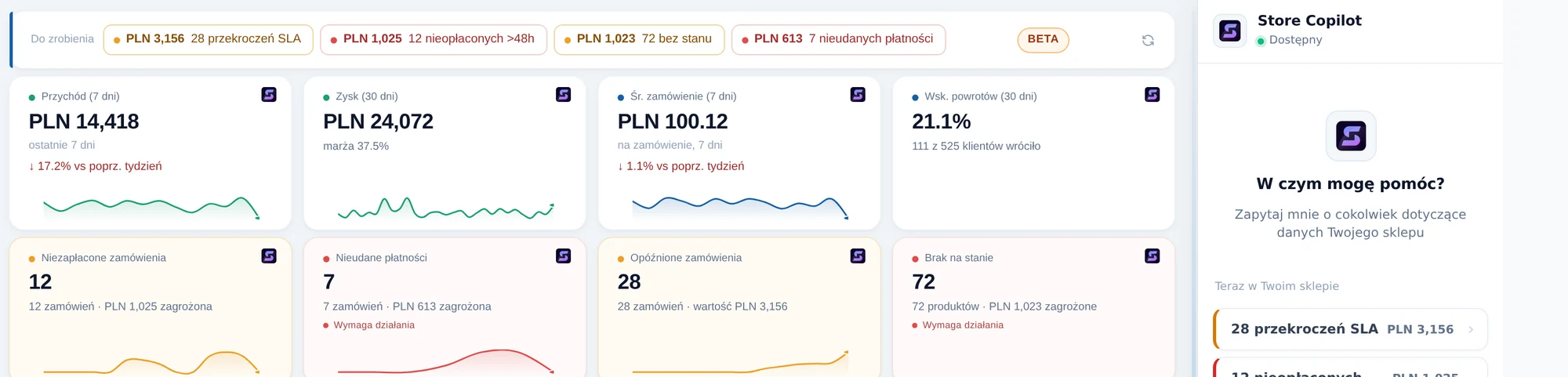
The owner’s assistant: ask in plain words and get an answer from the shop’s data. The copilot is the same idea as Shopify Sidekick. On AtomStore it changes nothing in the shop. Demo shop in Polish, sample numbers.
What data Sensbot reads
When a message arrives, Sensbot pulls live data from your store. No manual lookup, no copy-paste.
Order status replies
Return handling
Product questions
Account replies
Store context
Sensbot scrapes your store's public pages once on install and keeps the knowledge base up to date automatically.
Policy & info questions
Brand & product context
Custom knowledge
What changes after install
Based on real messages handled with order and customer data


Same AI. Different channels.
Every channel uses your store data to generate replies.
Direct channels
Registration takes about 10 minutes, and the connection check is automatic. Nothing needs to be installed on the platform side.
Register your shopNo. We read the shop’s data through the Atom REST API with an administrator account that has read methods only. Sensbot never needs methods that create, change or delete anything. Actions in the shop, such as a return, a cancellation or an address change, are enabled on request.
Chat and analysis on orders, products, stock levels and margin, the dashboard and reports. Returns and complaints from the AtomStore complaints module, without amounts. The copilot changes nothing in the shop. Read-only mode is our standard at the start, and our copilot for Shopify works the same way. Bulk changes, sending emails to the shop’s customers, and connecting Google Analytics, Google Ads and Meta Ads are enabled on request, agreed with AtomStore.
No. Webhooks are optional, on the AtomStore MAX and Enterprise plans. Without them we check for new orders and changes about every 10 minutes, and with AtomStore webhooks usually within a few minutes.
Shops with several websites in one panel do not connect on their own through the registration page. Write to info@sensbot.ai and we will connect them by hand, together with you.
On the chatbot this is an on-request feature. The email assistant puts the status of the customer’s complaint or return into the draft: number, status, type (return, complaint, exchange), products and the return tracking number.
We store shop, mailbox and chat data on servers in Germany, and Sensbot is an EU company. Replies are generated by OpenAI models, our sub-processor; this part of the processing may take place outside the EU, under the EU standard contractual clauses. The data is not used to train models, and we sign a data processing agreement with every customer.
List of sub-processorsFree store support audit
We check by hand how your store answers customers. Free, no access, report by email.
Live for two years, with 100+ stores across Europe, most of them in Poland.
Registration takes about 10 minutes, and the connection check is automatic.
14 days free, then a monthly subscription.